Main Settings
Documentation for Main Settings in the FCU developer guide, covering setup, configuration, workflows, and troubleshooting for Unity projects.
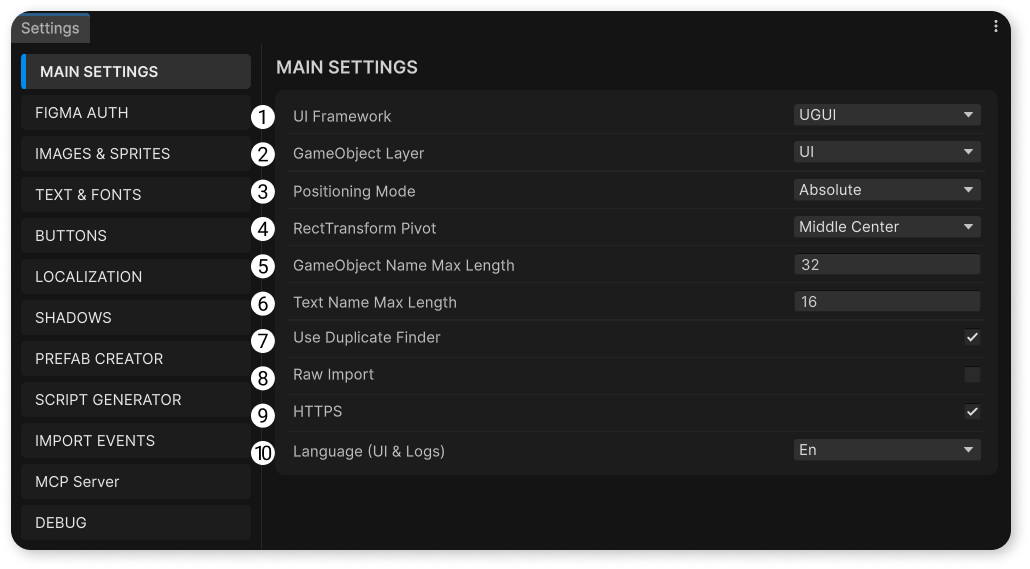
UI Framework
- UGUI - layout import into Canvas.
- UITK - layout import into UI Builder.
- NOVA - layout import into Nova UI.
GameObject Layer
Sets the Layer value for all imported GameObjects.
Positioning Mode
- ABSOLUTE - positioning of frames on the canvas as in Figma.
- GAMEVIEW - anchoring frames to the edges of GameView (does not work in UITK mode).
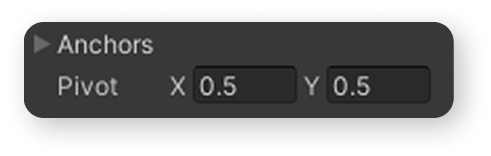
RectTransform Pivot
The value that will be assigned to all imported objects.
GameObject Name Max Length
Maximum length of GameObject names.
Text Name Max Length
Maximum length of names for GameObjects containing a text component.
Use Duplicate Finder
Runs the duplicate finder after import to highlight identical sprites that can be grouped and cleaned up.
Raw Import
If enabled, your project is imported "as is", i.e., without "smart" merging of individual vectors into single sprites.
The function is in beta stage, and errors may occur during its using.
HTTPS
Enable or disable HTTPS when accessing Figma servers in case of certificate issues.
Language
Sets the language used by Converter windows and log messages.
Switch it to work in your preferred locale.