Animations
Documentation for Animations in the D.A. Button, covering setup, configuration, workflows, and troubleshooting for Unity projects.
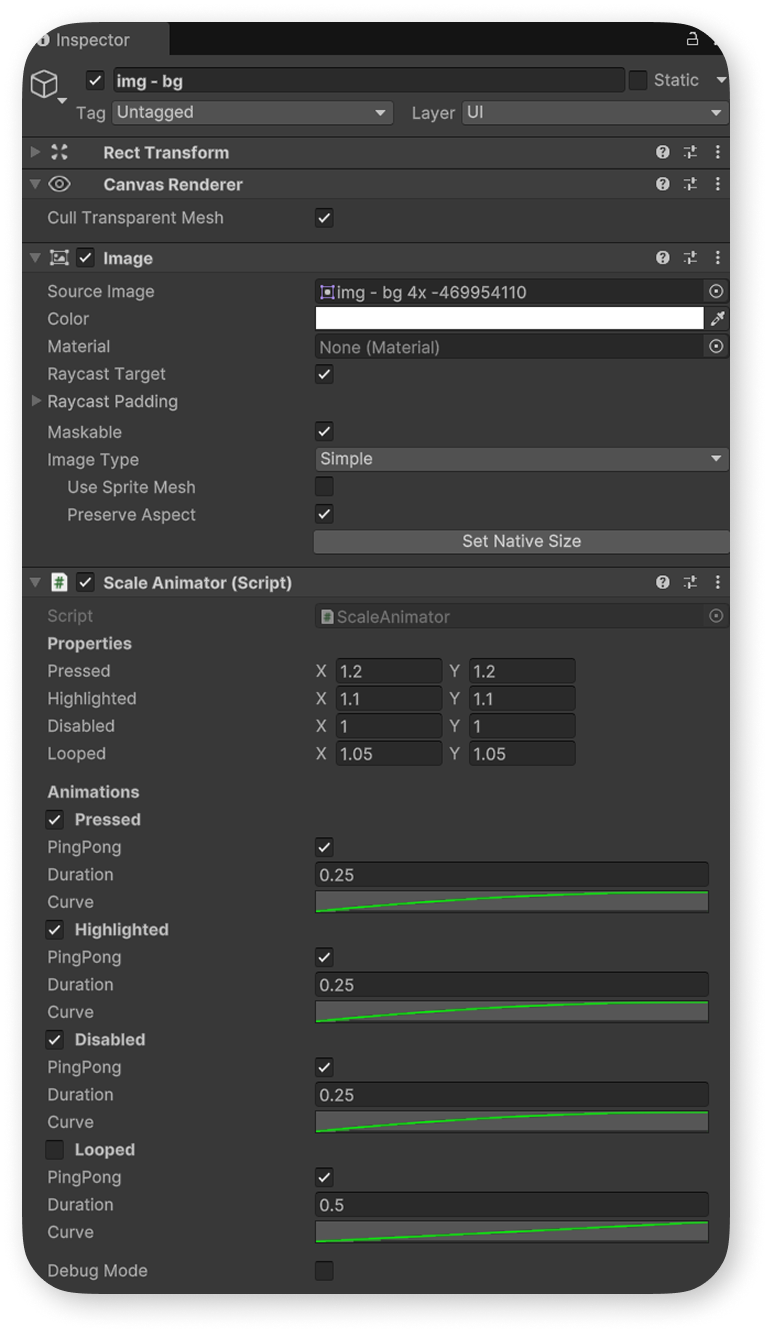
To animate a specific Graphic, you can use one of the following animator scripts, each serving a specific function:
- ColorAnimator – Animates color changes.
- PositionAnimator – Animates movement.
- RotationAnimator – Animates rotation.
- ScaleAnimator – Animates scaling.
- SpriteAnimator – Animates sprite transitions.
Animator settings are divided into two sections:
Properties and Animations.
Properties defines animation values applied to the Graphic over time based on the Curve from the Animations section.
Animations are triggered by specific UI events:
- Pressed – Triggered by "IPointerClickHandler".
- Highlighted – Triggered by "IPointerEnterHandler".
- Disabled – Activated when "Interactable" is set to "false".
- Looped – If enabled, a looping animation starts automatically at game start.
Each animation has configurable parameters:
Duration – Defines the time for the animation to play when an event occurs and the time required for the Graphic to return to its initial state.
Curve – Specifies the animation curve for smooth transitions.
PingPong
- If enabled, the animation plays twice:
Once when the event occurs, and again in reverse when returning to the initial state.
- If disabled, the curve plays once. Ensure the Y values at the start and end match to prevent abrupt transitions.