Asset UI
Documentation for Asset UI in the FCU developer guide, covering setup, configuration, workflows, and troubleshooting for Unity projects.
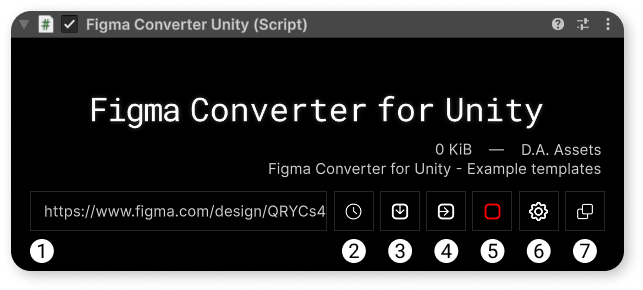

Link to your project in figma.
Open the list of cached projects that you have previously imported.
From the list, you can select the project you want to import.
Download the project from the link.
All downloaded projects are automatically cached.
Import selected frames from the downloaded project.
Stop import.
Open asset settings.
Switch the asset display mode. Available modes:
- In the inspector
- Windowed
Label displaying the current and latest version of the asset.
The version can be labeled as:
a. Stable — a stable version.
b. Beta — a version for which it is not yet known whether it is stable or contains bugs.
c. Buggy — a version that contains errors which significantly interfere with the asset's operation.